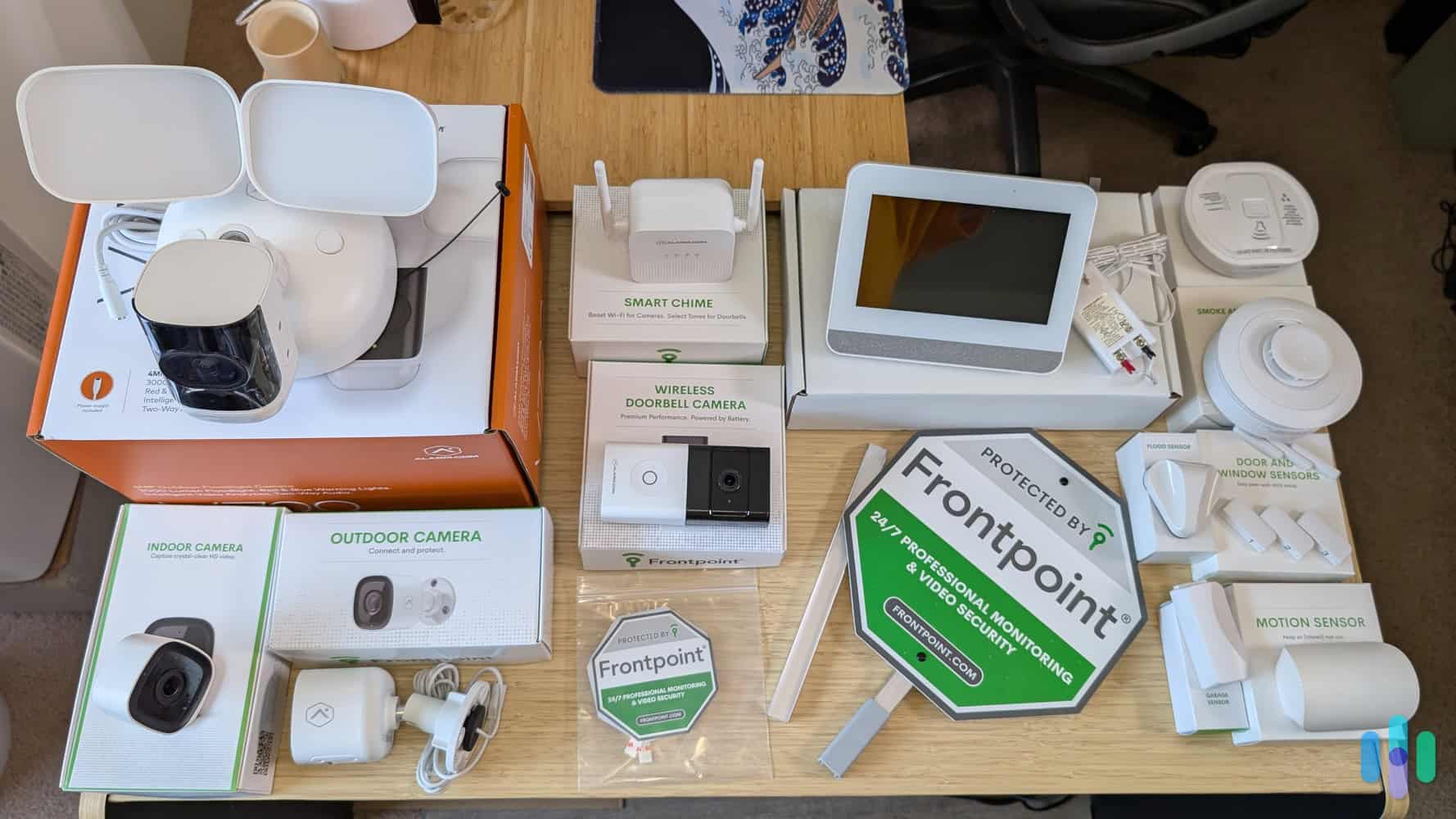
Keeping your home safe has become easier than ever thanks to modern security technology. Traditional locks and basic outdoor lights still play an important role, but today’s smart home devices provide an extra layer of protection, convenience, and peace of mind. Whether you own a house or rent an apartment, upgrading your home’s security can help deter intruders, monitor activity, and notify you instantly if something unusual happens.
The best home security system doesn’t always mean buying the most expensive equipment. Instead, it means choosing the right combination of smart cameras, video doorbells, motion sensors, smart locks, and alarm systems based on your home’s size, budget, and security needs.
Why Upgrade Your Home Security?
Home security is about more than preventing burglary. Modern systems help homeowners monitor deliveries, check on pets, communicate with visitors remotely, and receive emergency alerts.
Benefits of upgrading include:
- Reduced risk of break-ins
- Remote access and monitoring
- Real-time smartphone notifications
- Video evidence if incidents occur
- Better insurance discounts in some cases
- Increased property value
- Greater peace of mind when traveling
Many smart devices also integrate with voice assistants and home automation platforms, allowing you to control your security system from almost anywhere.
Smart Security Cameras
Smart security cameras are one of the most valuable upgrades for any property. They allow homeowners to watch live video, review recordings, and receive alerts when movement is detected.
Types of Security Cameras
Indoor Cameras
Designed to monitor living rooms, hallways, nurseries, and other indoor spaces.
Best for:
- Watching children
- Monitoring pets
- Checking elderly family members
- Indoor security
Outdoor Cameras
Outdoor cameras are weather-resistant and built to withstand rain, heat, snow, and dust.
Ideal locations include:
- Front entrance
- Backyard
- Garage
- Driveway
- Side gates
Floodlight Cameras
These combine a security camera with bright LED floodlights that activate when motion is detected. Sudden lighting often discourages unwanted visitors.
Features to Look For
Choose cameras with:
- 1080p or 2K video resolution
- Night vision
- Wide viewing angle
- Motion detection
- Two-way audio
- Weather resistance
- Cloud or local storage
- Smartphone app compatibility
- Person, vehicle, and package detection
Higher-resolution cameras provide clearer footage that can make identifying people or vehicles much easier.
Video Doorbells
Video doorbells have quickly become one of the most popular home security upgrades.
Instead of opening the door to unknown visitors, homeowners can see, hear, and speak with anyone at the entrance using a smartphone.
Benefits of Video Doorbells
A video doorbell allows you to:
- Answer the door remotely
- Monitor package deliveries
- Record visitors
- Detect suspicious activity
- Receive motion alerts
- Reduce package theft
Some advanced models use artificial intelligence to distinguish between people, animals, vehicles, and packages, reducing unnecessary notifications.
Wired vs Battery-Powered Doorbells
Wired Models
Advantages include:
- Continuous power
- No battery charging
- Stable performance
Disadvantages:
- More complicated installation
- Existing wiring may be required
Battery Models
Advantages include:
- Easier installation
- Flexible placement
- Suitable for renters
Disadvantages:
- Batteries require periodic charging
Motion Sensors
Motion sensors are a simple but highly effective security upgrade.
Instead of recording continuously, they detect movement and trigger cameras, lights, alarms, or smartphone alerts.
Types of Motion Sensors
Passive Infrared (PIR)
These sensors detect body heat and are commonly used in residential security systems.
Microwave Sensors
Microwave sensors use radio waves to detect movement and generally cover larger areas than PIR sensors.
Dual Technology Sensors
These combine infrared and microwave detection to reduce false alarms caused by pets, weather, or environmental changes.
Best Places to Install Motion Sensors
Install sensors near:
- Front entrance
- Back doors
- Hallways
- Garages
- Basements
- Large windows
- Patio doors
Avoid aiming sensors directly toward heating vents, fireplaces, or windows receiving strong sunlight.
Smart Locks
Smart locks replace or enhance traditional door locks by allowing keyless entry.
Instead of carrying physical keys, homeowners can unlock doors using:
- Smartphone apps
- PIN codes
- Fingerprint recognition
- Voice assistants
- Smart home routines
Advantages of Smart Locks
Smart locks offer several benefits:
- Remote locking and unlocking
- Temporary guest access
- Automatic locking schedules
- Lost key prevention
- Entry activity logs
- Integration with security systems
Families often appreciate the ability to assign unique codes to each household member.
Features Worth Considering
Look for locks that include:
- Auto-lock functionality
- Backup physical keys
- Long battery life
- Tamper alerts
- Strong encryption
- Weather resistance
- Multiple access methods
Some premium smart locks can automatically unlock as you approach your front door using your smartphone’s location.
Alarm Systems
An alarm system remains one of the strongest deterrents against intruders.
Modern systems do much more than sound a loud siren.
Today’s smart alarms can:
- Detect unauthorized entry
- Notify homeowners instantly
- Contact professional monitoring centers
- Trigger indoor and outdoor sirens
- Activate cameras
- Control smart lighting
Components of a Modern Alarm System
A complete system typically includes:
- Control panel
- Door sensors
- Window sensors
- Motion detectors
- Indoor siren
- Outdoor siren
- Smartphone app
- Backup battery
Some systems also include smoke detectors, carbon monoxide detectors, water leak sensors, and panic buttons.
Professional Monitoring vs Self Monitoring
Professional Monitoring
A monitoring center responds to alarm events and can contact emergency services if necessary.
Pros:
- 24/7 monitoring
- Faster emergency response
- Works while you’re asleep or traveling
Cons:
- Monthly subscription costs
Self Monitoring
Alerts go directly to your smartphone.
Pros:
- No monthly fees
- Greater control
- Lower long-term cost
Cons:
- You must respond to alerts yourself.
Window and Door Sensors
These small devices detect when a window or door is opened unexpectedly.
If the security system is armed, opening the sensor triggers an alarm and sends a notification.
Install sensors on:
- Front door
- Rear entrance
- Basement windows
- Sliding glass doors
- Garage entry door
These sensors are affordable and significantly improve overall home security.
Smart Outdoor Lighting
Lighting plays a major role in home security.
Dark areas around your property create hiding places for intruders.
Motion-activated lighting automatically illuminates:
- Driveways
- Walkways
- Front porch
- Backyard
- Garage
- Side entrances
LED smart floodlights are energy-efficient and can often be controlled remotely.
Security Signs and Visible Cameras
Visible security equipment can discourage criminals before they even attempt entry.
Consider displaying:
- Alarm system signs
- Security camera stickers
- Visible outdoor cameras
- Motion lights
Many burglars prefer easy targets and may avoid homes that appear well protected.
Choosing the Right Home Security System
Every home has different security needs.
Apartments
Focus on:
- Video doorbell
- Indoor camera
- Smart lock
- Door sensor
Small Houses
Recommended upgrades include:
- Outdoor cameras
- Motion sensors
- Alarm system
- Smart lighting
Large Homes
Consider installing:
- Multiple outdoor cameras
- Indoor cameras
- Smart locks
- Full alarm system
- Window sensors
- Garage monitoring
- Professional monitoring service
DIY vs Professional Installation
Many smart home devices are designed for easy installation.
DIY Installation
Advantages:
- Lower cost
- Flexible scheduling
- Easy upgrades
- Suitable for renters
Challenges:
- Requires basic tools
- Initial setup takes time
- Wi-Fi configuration
Professional Installation
Advantages:
- Proper device placement
- Expert configuration
- Faster setup
- Warranty support
Challenges:
- Higher installation costs
- Scheduling appointments
Step-by-Step Installation Guide
Installing a home security system is easier when completed in stages.
Step 1: Assess Your Property
Walk around your home and identify:
- Entry doors
- Ground-floor windows
- Blind spots
- Dark outdoor areas
- Garage access
- Backyard entrances
Step 2: Improve Wi-Fi Coverage
Most smart security devices rely on a stable internet connection.
If your Wi-Fi signal is weak near outdoor cameras or doorbells, consider installing a mesh Wi-Fi system or range extender.
Step 3: Install Smart Cameras
Mount outdoor cameras approximately 8 to 10 feet above ground.
Position them to monitor:
- Front entrance
- Driveway
- Backyard
- Garage
- Side gates
Avoid pointing cameras directly toward neighboring properties to respect privacy.
Step 4: Install the Video Doorbell
Replace the existing doorbell or mount the battery-powered unit beside your front door.
Ensure visitors’ faces are clearly visible.
Step 5: Add Motion Sensors
Install sensors in hallways and major traffic areas where an intruder would likely pass.
Keep them away from heating vents and direct sunlight.
Step 6: Install Door and Window Sensors
Place sensors on all primary entry points.
Test each one after installation.
Step 7: Install Smart Locks
Replace the existing deadbolt according to the manufacturer’s instructions.
Create secure PIN codes and enable two-factor authentication if available.
Step 8: Configure the Mobile App
Connect every device to your home network.
Customize:
- Notification preferences
- Motion sensitivity
- Recording schedules
- User permissions
- Emergency contacts
Step 9: Test the Entire System
Walk around your property and verify that:
- Cameras detect movement
- Motion sensors trigger alerts
- Door sensors activate correctly
- Smart locks operate smoothly
- Alarm sirens function properly
Regular testing ensures everything continues working as expected.
Home Security Maintenance Tips
Even the best equipment requires occasional maintenance.
Follow these recommendations:
- Clean camera lenses every few months.
- Replace batteries before they become fully depleted.
- Install firmware updates regularly.
- Review recorded footage occasionally.
- Test alarms monthly.
- Trim trees or shrubs blocking camera views.
- Update Wi-Fi passwords periodically.
- Remove access for former guests or tenants.
- Check cloud storage subscriptions if applicable.
Routine maintenance helps prevent failures when you need your security system most.
Common Mistakes to Avoid
Many homeowners reduce the effectiveness of their security system without realizing it.
Avoid these common mistakes:
- Installing cameras too high or too low
- Ignoring blind spots
- Using weak passwords
- Forgetting software updates
- Relying on only one camera
- Disabling notifications
- Leaving spare keys outside
- Failing to test alarms regularly
- Using outdated routers with poor Wi-Fi coverage
How Much Do Home Security Upgrades Cost?
Costs vary depending on the size of the home and the equipment selected.
Typical expenses include:
- Smart cameras: $30–$300 each
- Video doorbells: $50–$350
- Motion sensors: $20–$100 each
- Smart locks: $100–$350
- Alarm systems: $150–$1,000 or more
- Professional monitoring: $10–$50 per month
Many homeowners start with a video doorbell and one outdoor camera, then expand the system over time.
Final Thoughts
Investing in home security is one of the smartest upgrades you can make. A well-planned system combining smart cameras, video doorbells, motion sensors, smart locks, alarm systems, and outdoor lighting creates multiple layers of protection that work together to keep your home safer.
The ideal setup depends on your property’s layout, budget, and lifestyle. Start by securing your main entry points, then expand coverage to vulnerable areas like garages, backyards, and ground-floor windows. Regular maintenance, software updates, and routine testing ensure your devices continue performing when they matter most.
Whether you choose a simple DIY setup or a professionally monitored security system, modern home security technology offers convenience, real-time awareness, and greater confidence that your home and loved ones are protected around the clock.