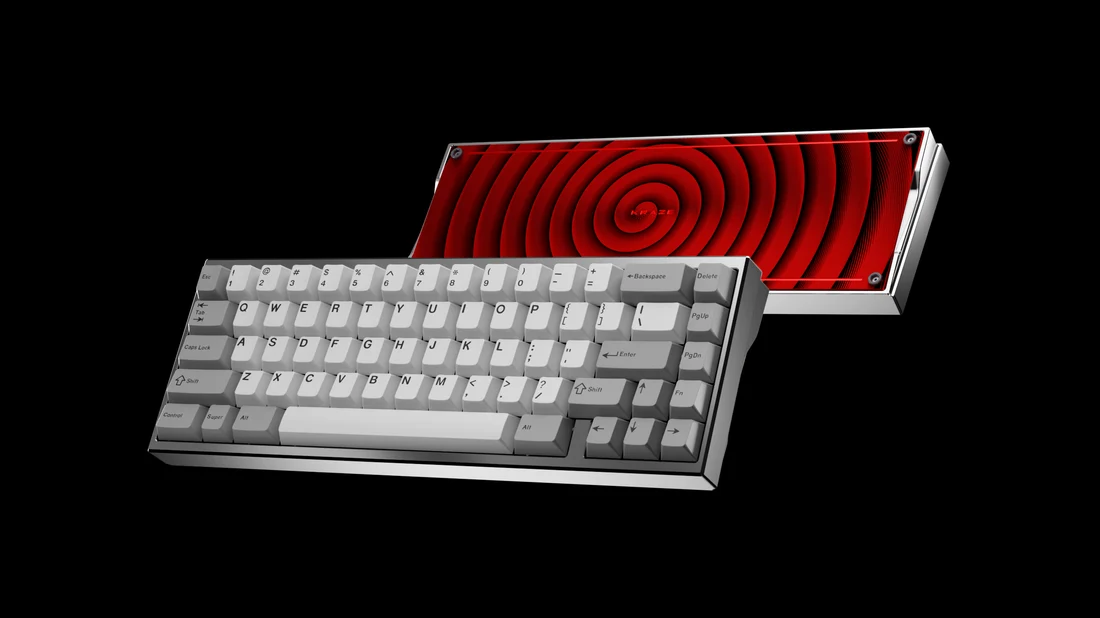
A 65% keyboard is a compact layout that usually keeps dedicated arrow keys while removing the number pad and function row. That makes it a practical middle ground for people who want more mouse space but still navigate documents and apps with physical keys.
The trade-off is access: functions such as F1–F12 generally move to an Fn layer, and the exact navigation cluster varies by model. A 65% layout can feel effortless for one workflow and frustrating for another. To see how those trade-offs appear in different models, compare a few 65 keyboard designs and check their key maps.
This guide explains the layout and uses current UniKeys examples such as QK65 MK3 and GDK Lab KV1-65 to show what to check. QK65 MK3 is listed as a pre-order; order status, configuration, and included parts must be checked on the selected listing.[UK1]
What Is a 65 percent Keyboard
A 65% keyboard is a compact layout category, usually with roughly 66–68 keys, dedicated arrows, and a small navigation cluster. The label is approximate: it is not a promise of a literal percentage of full-size keys or a particular case dimension.
Unlike a 60% keyboard, which usually removes dedicated arrow keys, a 65% keyboard retains a separate arrow-key cluster. Many models also include a vertical column of navigation keys, such as Delete, Page Up, Page Down, or Home.
The layout removes the dedicated function row (F1–F12) and numeric keypad to reduce its overall footprint. These functions may still be accessible through an Fn key or programmable shortcuts.
For people who want a smaller keyboard without relying entirely on key combinations for navigation, a 65% layout can be a comfortable compromise.
What Keys Does a 65 percent Keyboard Have
Most 65% keyboards include the following:
Standard alphanumeric keys, including letters, numbers, and punctuation.
Modifier keys such as Shift, Ctrl, Alt, and Windows or Command.
Dedicated arrow keys for moving through text and navigating interfaces.
Several additional keys, often including Delete, Home, Page Up, or Page Down.
An Fn key or programmable layer for accessing functions that do not have dedicated keys.
The exact arrangement varies between models. Some use different-sized Shift or bottom-row keys, which can affect replacement keycap compatibility.
How Is a 65 percent Keyboard Different from a Full Size Keyboard
A standard US full-size keyboard typically has 104 keys, including a numeric keypad, function row, navigation cluster, and arrow keys. A 65% keyboard removes the numeric keypad and dedicated function row while compressing the navigation area.
This smaller footprint can leave more room for a mouse, notebook, or other desk accessories. The trade-off is that users who frequently enter numbers or use F-keys may need to rely on shortcuts or choose a larger layout.
What Are the Benefits of a 65 percent Keyboard
The main appeal of a 65% keyboard is its balance of compactness and everyday usability. It removes several keys that some users rarely need while retaining the dedicated arrow keys that make document navigation more convenient.
UniKeys’ QK65 MK3 is an example of a customizable 65% platform listed as a pre-order. Review its PCB, plate, and keycap options separately; the matching keycaps are optional rather than automatically included with every configuration.
However, a compact layout is not automatically more comfortable or productive for everyone. The right choice depends on how frequently you use the keys that have been removed.
How Does a 65 percent Keyboard Save Desk Space
A 65% keyboard usually saves width compared with full-size layouts by omitting the numeric keypad and using a compact navigation area. Removing the function row mainly reduces depth. Case design determines the actual space saved.
For example, someone working at a small apartment desk might position a laptop beside a 65% keyboard and still have room for a mouse. A competitive FPS player may also appreciate the additional space available for broad mouse movements.
Compare actual dimensions: UniKeys lists GDK Lab KV1-65 at 313 × 113 mm and Kraze 65 at 313 × 109 mm. Kraze 65 is listed as an extras pre-order. Similar layout labels can still mean different footprints and buying conditions.
Is a 65 percent Keyboard Good for Gaming and Typing
For gaming, a 65% keyboard keeps the familiar WASD keys, modifier keys, and dedicated arrows within a compact layout. The reduced width can make it easier to position a mouse comfortably, particularly in games that involve frequent aiming.
For typing, the arrow keys help with editing sentences, moving through paragraphs, and navigating spreadsheets or code. Writers and students may find this more convenient than a 60% keyboard that requires a function layer for arrow input.
The main limitation is the missing function row. Some games and applications rely on dedicated F-keys, so check whether their shortcuts work comfortably through the keyboard’s Fn layer.
65 percent Keyboard vs Other Keyboard Sizes What Are the Differences
Keyboard sizes differ mainly in their available keys, overall footprint, and reliance on shortcuts. The following comparison can help narrow down your options.
| Layout | Typical key count | Dedicated arrow keys | Function row | Best suited for |
| 60% | Around 61 | Usually no | No | Minimalist setups and compact gaming desks |
| 65% | Around 66–68 | Yes | No | Everyday typing, gaming, and general use |
| 75% | Around 82–84 | Yes | Yes | Programming and productivity |
| TKL | Around 87 | Yes | Yes | General office work and gaming |
| Full-size | Around 104 | Yes | Yes | Data entry and number-heavy tasks |
These counts are typical rather than universal. Some models add dedicated media controls or use alternative layouts.
65 percent vs 60 percent Keyboard Which Layout Is More Practical
A 60% keyboard is smaller and often suits users who want a minimalist setup. However, it usually lacks dedicated arrow keys and requires shortcuts for navigation.
A 65% keyboard adds arrow keys and several navigation keys without becoming much larger. If you regularly edit documents, browse spreadsheets, or move through code, those extra keys can make daily tasks more straightforward.
Choose 60% if minimal size is your priority. Choose 65% if you want compactness without giving up dedicated arrows.
65 percent vs 75 percent Keyboard Which Offers Better Functionality
A 75% keyboard retains the arrow keys and adds a dedicated F1–F12 row. It usually includes more navigation keys while keeping the numeric keypad removed.
This can be helpful for programmers who use debugging shortcuts, office workers who rely on function keys, and users who prefer not to memorize additional key combinations.
A 65% keyboard is often the better fit when you value a smaller footprint and do not frequently need dedicated function keys. The 75% layout makes more sense when direct access to those keys matters.
65 percent vs TKL Keyboard Which Is Better for Your Setup
A TKL keyboard removes the numeric keypad but retains the function row and a more complete navigation cluster. It is a familiar option for users transitioning from a full-size keyboard.
A 65% keyboard takes space saving further by removing the function row and compressing the navigation keys. It can suit a smaller desk, but TKL may be more convenient for spreadsheet-heavy work or applications that rely on F-keys.
What Features Should You Look for in a 65 percent Keyboard
Once you have chosen the layout, consider how the keyboard feels, connects to your devices, and supports future customization. A compact design alone does not determine typing comfort or build quality.
Should You Choose Mechanical or Membrane Switches
Mechanical keyboards use individual switches beneath the keys. Depending on the switch design, they can provide a linear, tactile, or clicky feel. This variety makes them popular among gamers, typists, and keyboard enthusiasts.
Membrane keyboards use a different underlying mechanism and are often chosen for their straightforward design and familiar typing feel. Neither type is automatically better for every user.
If you type for several hours daily, consider switch force, sound, key travel, and how the keyboard feels during a real typing session. In shared offices, quieter switches may be more considerate than loud clicky options.
What Keycaps Connectivity and Customization Options Matter
UniKeys Mai Lang is a dye-sublimated PBT set in Cherry profile. TUT C.C.C.C is another Cherry-profile PBT example, with 1.6 mm thickness and five-sided dye-sublimation. Check the kit diagram against the exact right Shift, spacebar, and bottom row of your 65% board.
GDK Lab KV1-65 is listed with tri-mode connectivity and QMK/VIA support. Check the selected configuration, compatible software, and current order status; inventory figures alone do not establish immediate shipment.
Also check operating-system support, RGB lighting, programmable keys, and software compatibility. If you plan to replace keycaps, verify the right Shift key size, bottom-row dimensions, and layout compatibility before purchasing a set.
Is a Hot Swappable 65 percent Keyboard Worth It
A hot-swappable keyboard lets you replace compatible switches without soldering. This is useful if you want to experiment with different typing feels or replace a faulty switch later.
For example, Kraze 65 lists separate MX, HE, and EC PCB options. Those are different electrical platforms: an MX hot-swap PCB does not make conventional mechanical, magnetic, and electrocapacitive switches interchangeable. Confirm the exact PCB and included parts.
If you are satisfied with the original switches and have no plans to modify them, a soldered model may be perfectly adequate.
How Do You Choose the Right 65 percent Keyboard for Your Needs
Start with your everyday activities rather than choosing a keyboard based only on appearance. A layout that works well for gaming may not be the most convenient option for data entry or software development.
What Should You Consider for Gaming Office Work and Everyday Use
Gaming: Look for responsive switches, reliable connectivity, anti-ghosting or N-key rollover support, and a layout that leaves enough room for mouse movement.
Office work: Consider typing feel, noise level, wireless options, and whether you can comfortably access the shortcuts used by your applications.
Programming: Dedicated arrow keys are useful for code navigation, but check whether you need frequent access to F1–F12, Home, End, or other navigation functions.
Everyday use: Prioritize a comfortable layout, dependable connection, and easy access to the keys you use most often.
Before buying, review the keyboard’s layout diagram and available remapping options. This is particularly important if you switch between Windows and macOS or use specialized software.
How Much Should You Spend on a 65 percent Keyboard
The right budget depends on the features and build quality you need. Entry-level models can cover basic typing and gaming, while more expensive options may offer improved materials, wireless connectivity, hot-swappable switches, sound-dampening components, or advanced customization.
Instead of paying for features you may never use, compare the switch type, case construction, connectivity, warranty, and software support. A less expensive keyboard that fits your workflow may be a better purchase than a premium model with unnecessary extras.
Compare the exact layout and included features rather than relying on the nominal keyboard size.
A 65 percent Layout Quick Fit Check
• List the keys you press most often during work or games. If F-keys are essential, check how the keyboard exposes them through layers.
• Compare the actual keyboard dimensions rather than assuming every 65% board occupies the same amount of desk space.
• Check the right-side key arrangement: Delete, Page Up, and Page Down may appear in different positions or require remapping.
• Decide whether you want a complete keyboard or a barebones kit, then budget separately for switches and keycaps if needed.
Conclusion
Choose a 65% keyboard if desk space, dedicated arrows, and a short reach between keyboard and mouse matter more to you than a physical function row.
Before purchasing, check the exact layout diagram, Fn mapping, switch compatibility, and what is included in the package. A compact keyboard works best when its missing keys do not interrupt the tasks you perform every day.
FAQs
Is a 65 percent keyboard better than a 60 percent keyboard
It depends on your needs. A 65% keyboard has dedicated arrow keys and usually several additional navigation keys, making it more convenient for document editing and general typing. A 60% keyboard is smaller and may suit users who prioritize minimalism and are comfortable using shortcuts.
Does a 65 percent keyboard have arrow keys
Yes. Most standard 65% keyboards include dedicated Up, Down, Left, and Right arrow keys. Their exact placement and surrounding navigation keys vary by model.
Is a 65 percent keyboard good for programming
A 65% keyboard can work well for programming because it retains dedicated arrow keys and takes up relatively little desk space. However, it usually lacks a dedicated function row, so developers who frequently use F-keys or navigation shortcuts should check the keyboard’s Fn layer and remapping options before buying.