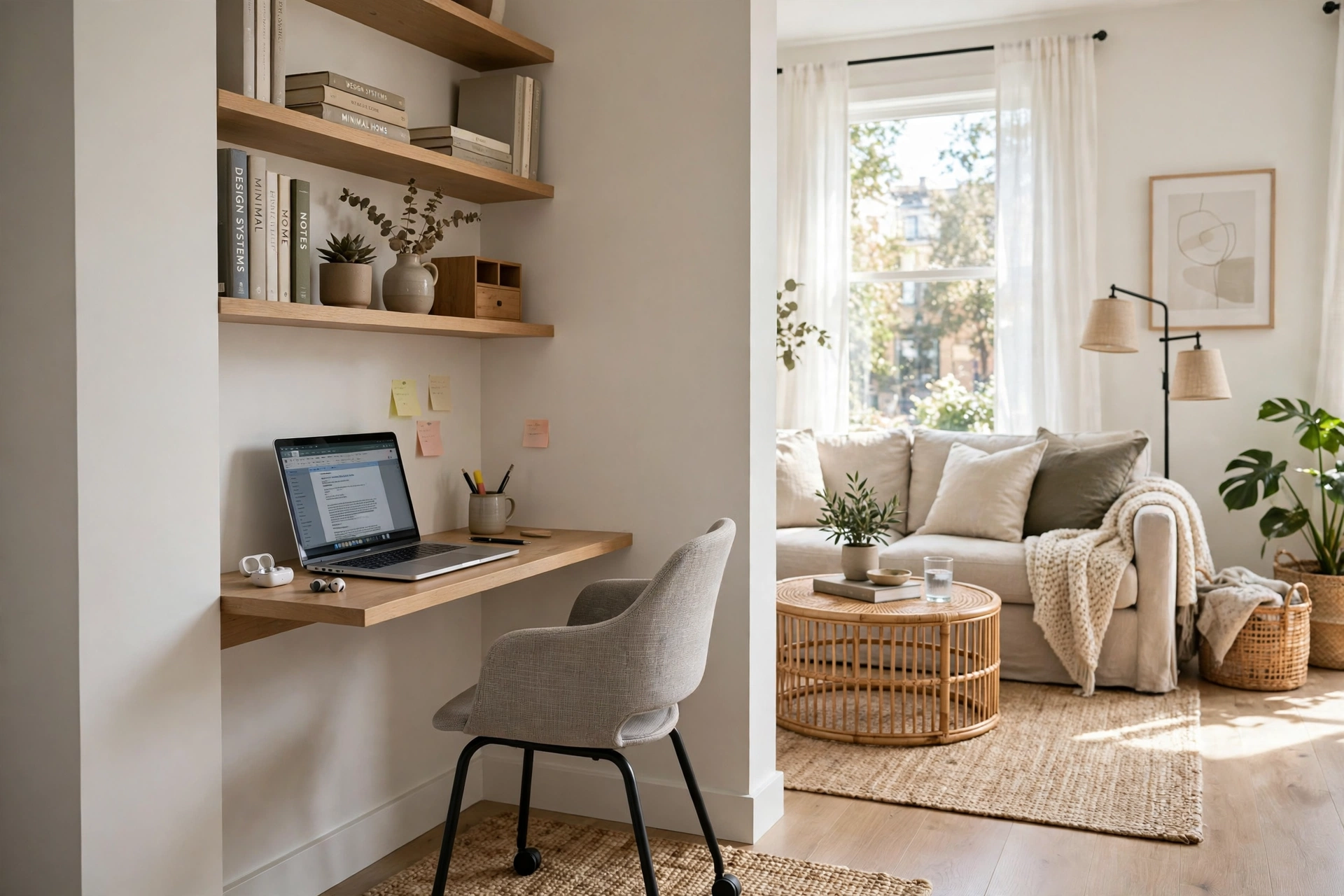
A living room that doubles as an office usually fails in the same quiet way: the desk lands where the room already works hardest, in front of the television, beside the main walkway, or in the middle of the seating area. Within a week the chair is in the way and cables trail across the rug. The problem is rarely the size of the room. It is the spot the desk was given.
Most living rooms already contain places a desk can live without taking anything away from relaxing, hosting, or watching television. Corners nobody sits in, the wall behind a sofa, a shallow alcove, and even a closet near the room can all hold a working setup. The trick is to match the desk to the dead space.
- In short: Put a compact home office in a living room corner, behind the sofa, inside an alcove or closet, or along a short wall near a window, using a desk no deeper than about 24 inches and a chair that tucks fully underneath it. Keep the seating, the television sightlines, and the walkways exactly where they are, and let the desk borrow wall space and vertical storage instead of floor space.
The Dead Zones in a Living Room That Make the Best Desk Spots
Walk into your living room and look for the places nobody actually uses: the corner beside a bookshelf that holds only a plant pot, the stretch of wall between a door frame and a window, the area behind a sofa, and the recess beside a chimney breast. A desk placed in one of these dead zones costs the room nothing it was already using.
Corners are the most forgiving dead zone of all. A corner desk, or a straight desk pushed into a corner, uses two walls at once, so the chair swings into space the room was not using anyway. Facing the wall also helps concentration, because the television sits behind you rather than in your eyeline. If the corner is near a window, even better: side light is kinder on the eyes than light from directly behind a screen, which causes glare. Alcoves work the same way, provided you measure first.
- The wall behind a sofa, where a slim console desk can face the room without blocking conversation.
- The short wall beside a window, where daylight does the work of a desk lamp for most of the day.
- A shallow alcove, inside a closet that opens onto the living room, where doors can close over the whole setup at night.
A Living Room Desk That Vanishes After Five O’Clock
The biggest reason living room offices feel intrusive is that they stay visible after work ends. A desk covered in papers, a monitor, and a tangle of cables turns the room back into an office every evening, even when nobody is working. The fix is a desk that can disappear, or at least tidy itself away, in under a minute.
A wall-mounted fold-down desk is the most complete version of this idea. It hangs flat against the wall when closed and drops down to a working surface when open. It suits laptop-based work best, because a fold-down surface rarely has room for a large monitor, a printer, and a stack of reference books at once. A secretary desk works on the same principle in furniture form: its drop-down front becomes the desk, and its drawers swallow the small items that otherwise spread across a living room. A converted closet, sometimes called a cloffice, goes one step further, with the desk and shelves living inside the closet and the doors closing over everything, cables included. Whichever option you choose, plan the end-of-day reset: a lidded box for the charger, notebook, and headphones means the desk can be cleared in seconds.
Five Desk Setups Compared for a Shared Living Room
Not every compact desk behaves the same way in a shared room. The table below compares the setups most homeowners actually choose.
A corner desk wins for comfort if you work full days, while a fold-down desk wins for invisibility if the room is small and the work is light.
Borrowing the Sofa’s Back Instead of the Room’s Floor
In many living rooms the sofa floats away from the wall, leaving a gap of a foot or more behind it that serves no purpose. A slim console table, about 18 to 20 inches deep, placed behind the sofa creates a desk that faces into the room, keeps the seating untouched, and uses space that was already empty.
This arrangement suits households where more than one person uses the room. The person working sits with their back to the sofa, so they are not staring at the television, and the people relaxing are not staring at a monitor. Two catches need planning. First, the chair needs somewhere to go when the desk is not in use, so choose a slim chair that slides under the console. Second, cables need a route that does not cross the walkway: a cable channel along the sofa’s back legs, or a power strip fixed under the console, keeps chargers off the floor.
Measuring the Spot Before the Desk Arrives
Most living room office mistakes are measuring mistakes. A desk that fits the wall but leaves no room to pull the chair out, or a chair that blocks a door swing, will make the setup feel wrong within days.
Mark the desk footprint on the floor with painter’s tape, including the chair pushed back, and walk around it for a day before ordering.
Leave roughly 30 to 36 inches behind the desk chair so you can stand up without twisting, and at least 24 inches of clear walkway past the chair.
Check the desk depth against your screen: a laptop works on a desk about 20 inches deep, while a monitor and keyboard are more comfortable at 24 inches or more, with the screen roughly an arm’s length away.
Note every door swing, radiator, and outlet near the spot. A desk should never block a door, sit hard against a radiator, or depend on an extension cord stretched across a walkway.
Write the measurements down and take them shopping. Desk listings often give only the desktop size, not the space the chair needs, and a tape outline on your own floor is worth more than any product photograph.
Light, Sound and a Video-Call Backdrop That Still Looks Like Home
A desk location that works on paper can still fail if the light is wrong. Sitting with a bright window directly behind you turns you into a silhouette on video calls, while facing a window all day invites glare. The better arrangement is side light, with a small adjustable lamp for dark mornings and evenings.
Sound is the other shared-room problem, and it is solved more by routine than by construction. Noise-cancelling headphones handle most household noise, and a simple agreement about call times handles the rest. If calls are frequent, position the desk so the camera background is a plain wall, a bookshelf, or a curtain, and test the angle before committing. For storage, two floating shelves above the desk, or a drawer unit that rolls under it, will hold a week’s supplies.
Seating That Works at a Desk and Still Belongs in the Room
The chair is where compact living room offices most often go wrong, because a full-size office chair can dominate a small room even when the desk itself is discreet. The goal is a chair that supports you for the hours you actually sit, then disappears or doubles up afterwards.
- A slim armless task chair slides fully under most desks and reads as an ordinary dining chair when guests visit.
- A dining chair with a supportive cushion works well for part-time desk use and needs no extra floor space at all.
- A folding or stacking chair suits very occasional work, but it is a poor choice for full days, because it rarely supports the lower back properly.
Whatever chair you choose, set it up properly: feet flat on the floor, knees roughly at right angles, and the top of the screen at or just below eye level. A laptop riser and a separate keyboard are the cheapest ergonomic upgrade for a small desk. If you work full days from the living room, do not compromise on the chair to save a few inches.
When the Setup Needs an Electrician, a Joiner or a Landlord’s Permission
Most compact living room offices are pure furniture and need no professional help. A few situations are different. If the plan involves a new electrical outlet, moving an existing one, or running power inside a wall, that is electrician’s work in most regions. Never daisy-chain power strips to feed a desk, and never run a cable under a rug where it can overheat or become a trip hazard. Wall-mounted desks and heavy shelves also need fixings matched to the wall, so check whether it is masonry, studwork, or plasterboard before drilling.
Renters should check the tenancy agreement before drilling or removing closet doors. When in doubt, a freestanding secretary desk or console desk gives the same result with no holes at all. Costs vary widely, and the figures below are estimates only, not quotes. A wall-mounted fold-down desk typically costs an estimated $80 to $300, a secretary desk an estimated $200 to $600, and a closet conversion an estimated $150 to $500 if you do the work yourself. A joiner-built desk or a new outlet fitted by an electrician will cost more, so get a quote first.
A Compact Living Room Office That Still Feels Like a Living Room
The test of a successful living room office is not how it looks at nine in the morning, but how the room feels at seven in the evening. If the desk folds away or tidies in a minute, the seating is untouched, and the walkways are clear, the office has been added without anything being sacrificed. Start with the dead zones and choose the setup that matches your real working hours.
Compact Living Room Office Questions Homeowners Keep Asking
Can a Desk Really Fit in a Living Room Without Shrinking the Seating Area?
Yes, provided the desk borrows wall space, dead zones, or closet space rather than floor the seating already uses. A corner desk, a behind-sofa console, or a fold-down desk leaves the sofa, chairs, and coffee table exactly where they are, so the seating area does not shrink at all.
How Wide Should a Living Room Desk Be for a Laptop and a Monitor?
A laptop alone is comfortable on a desk about 36 inches wide, while a laptop or monitor paired with a separate keyboard is more comfortable at about 48 inches wide. Allow about 24 inches of depth so the screen sits roughly an arm’s length away.
Where Should a Living Room Desk Go to Avoid Screen Glare?
Put the window to the side of the desk rather than directly behind you or directly behind the screen. Light from behind you creates glare and turns you into a silhouette on video calls, while facing a bright window all day strains the eyes. Side light is most comfortable.
How Do I Hide a Work Desk When Guests Come Over?
Choose a setup that closes: a fold-down desk that folds flat, a secretary desk whose front drops up, or a closet office whose doors shut over everything. Then give every work item a home, such as a drawer or a lidded box, so clearing the desk takes under a minute.
Can I Work Full-Time From a Fold-Down Desk?
It depends on the work. A fold-down desk suits laptop-based work, writing, and calls very well, but it struggles with large monitors, printers, and piles of reference material. For full-time work with heavy equipment, a corner desk or a closet office with a proper chair is the better choice.
What Chair Works in a Living Room Office That Doubles as Guest Seating?
A slim armless task chair or a supportive dining chair is the best compromise, because both slide under the desk and look at home around a table. Avoid bulky gaming or executive chairs in a shared room. Whatever you choose, check that it supports your lower back and lets your feet rest flat on the floor.