
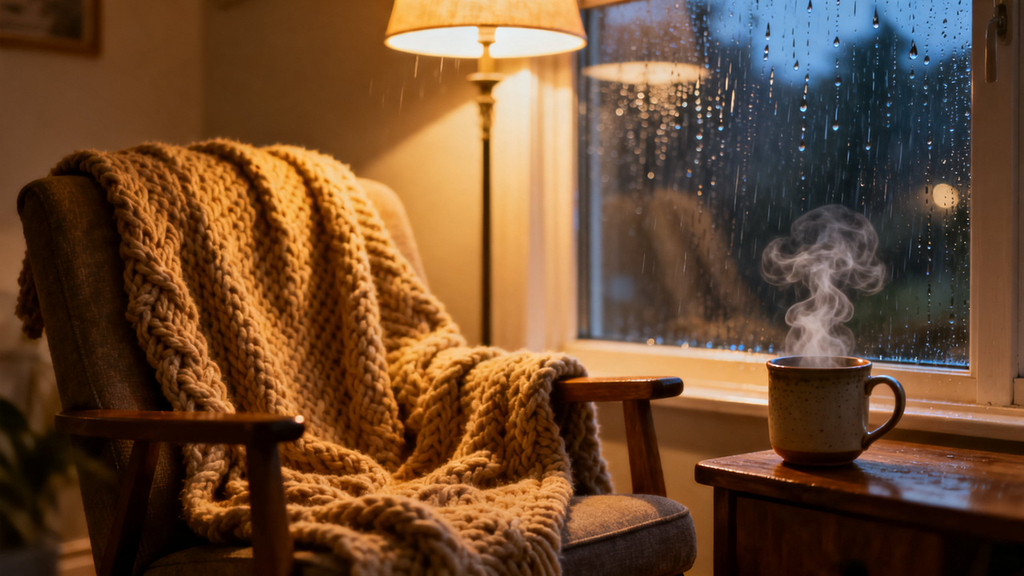
A cozy scene is built from small, quiet details, steam rising off a mug, soft lamplight, a blanket shifting slightly as someone settles in. A photo can capture the setting, but it misses the small movements that actually make a space feel warm and lived-in. Text to video tools hold onto that quiet motion, and Dreamina’s Seedance 2.5 renders cozy home scenes with enough softness and detail that a clip feels like an actual quiet afternoon rather than a staged photo.
Why coziness depends on small, quiet motion
Coziness isn’t a big moment, it’s a collection of small ones, steam curling upward, a page turning, a candle flickering. A still photo shows the setting but misses what actually makes it feel warm. Motion is what turns a nicely decorated room into a space that feels genuinely lived-in.
Picking the detail that sets the whole mood
Trying to show an entire cozy afternoon in one clip usually loses the quiet feeling. Choose a single small detail instead:
- Steam rising from a warm drink on a side table
- A blanket being pulled over by someone settling into a chair
- Rain or snow visible through a window beside warm interior light
One small, well-chosen detail says more about coziness than a wide shot of a whole decorated room.
Writing a prompt that keeps the mood soft
A vague prompt like “cozy room” leaves the actual feeling up to guesswork. Describe the specific light source, a lamp, a candle, firelight, and the small motion that brings the scene to life, steam, a page turning, rain against glass. That detail is what keeps a cozy scene from looking like a furniture catalog.
Your three-step path from idea to finished scene
Step 1: Settle into your prompt
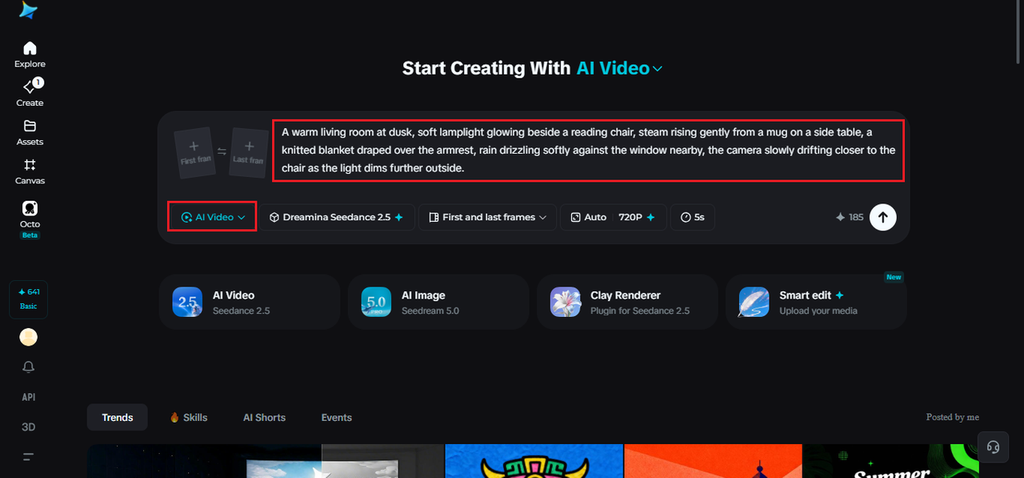
Visit Dreamina, sign in, and head to the “AI Video” section. Click “Add reference image” if you have a photo close to the room you’re picturing, then write your prompt describing the scene. For text to video creations, skip the image and describe the full mood instead.
Here’s a sample: A warm living room at dusk, soft lamplight glowing beside a reading chair, steam rising gently from a mug on a side table, a knitted blanket draped over the armrest, rain drizzling softly against the window nearby, the camera slowly drifting closer to the chair as the light dims further outside.
Step 2: Let Seedance 2.5 warm it up
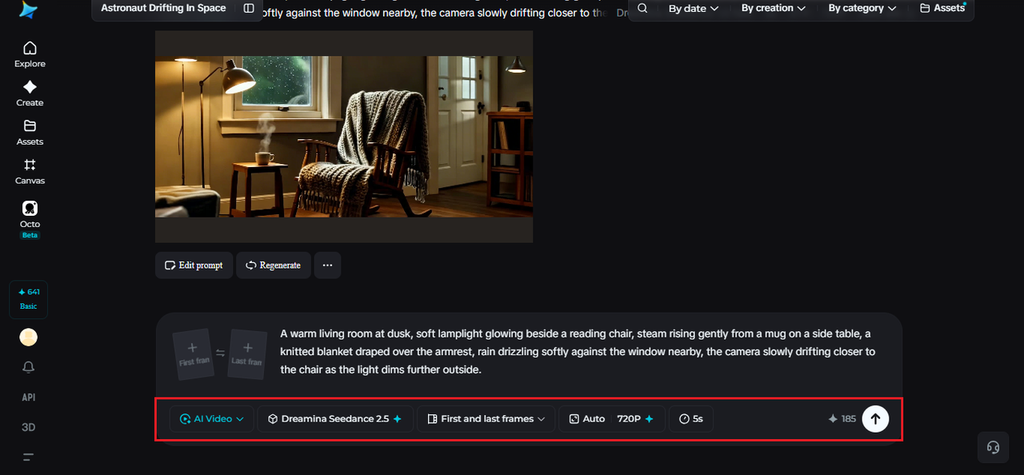
Choose the Seedance 2.5 model once your prompt is ready, since it handles soft light and small ambient motion well. Pick a video length, then an aspect ratio, 16:9 for YouTube or 9:16 for TikTok. Click Dreamina’s generate icon and give it a few seconds to process.
Step 3: Soften the details and export
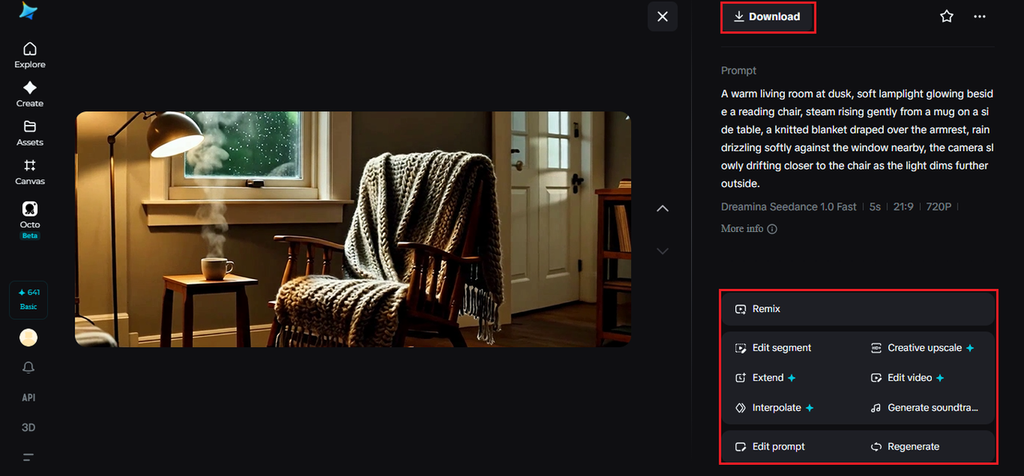
Review the clip once it’s back, checking that the light and small movements feel calm and natural. Use Upscale to sharpen fine detail like steam, fabric texture, and rain on glass, and Generate soundtrack to add a soft ambient layer. Export once it feels warm and complete.
How Seedance 2.5 handles quiet, small-scale motion
Seedance 2.5 was engineered to hold onto the kind of subtle, small movement that cozy scenes depend on far more than any high-action sequence would.
Soft light rendered without flattening
Lamp glow, candlelight, and firelight are kept warm and distinct rather than blending into one generic yellow tone, which matters for a scene that depends entirely on its lighting for mood.
Naturalistic small-scale motion
Steam curling, fabric settling, rain tapping against glass, these tiny movements are rendered consistently across a clip instead of looking stiff or looping unnaturally.
Extended duration for a full quiet moment
Ultra-long generation up to 180 seconds lets a cosy scene sit and breathe, giving small details enough time to register instead of rushing past them.
A second detail that deepens the warmth
Not every cozy shot needs the whole room. A closer detail, hands around a mug, a page mid-turn, adds warmth without needing the full scene around it. Adding a detail like this keeps a cosy video from feeling like a wide, empty room.
Sound that completes warmth
A cozy scene depends heavily on soft ambient sound, rain against a window, a crackling fire, the quiet rustle of a page. Dreamina’s soundtrack tool can layer that directly, rounding out the mood without needing separate audio work.

Layering small imperfections
A scene that’s too tidy can start to feel artificial, coziness usually comes with a little mess, a stack of books slightly uneven, a blanket not quite folded, a cushion still holding the shape of where someone was sitting. Describing those small imperfections promptly adds believability that a perfectly arranged room doesn’t have. It’s a small detail, but it’s often what makes a space feel like someone actually lives there rather than a room staged for a photo. That sense of quiet, everyday disorder is part of what coziness is built on.
Where these scenes are already settling in
Home and lifestyle brands use them to showcase products in a lived-in setting, candle and décor sellers use them to sell mood as much as the object itself, and independent creators use them to build calming content without needing a fully staged room. A quiet afternoon that once needed the right light and a lot of patience can now start as a written description.
Coziness used to depend on catching the right light at the right moment in an actual room. With Dreamina and the soft, detail-aware rendering of Seedance 2.5, that quiet warmth can be built from a written idea, letting anyone settle into an afternoon that only exists as a description.